%2010.svg)


Table Of Contents
When an examiner pulls a client file, the risk rationale should be in the file. Not reconstructed weeks later from email threads, CRM notes, and spreadsheets.
That principle drove most of what we shipped this month. The July release makes documentation faster to produce, makes the data underneath it more defensible, and hardens the way your team logs in and connects. Here's what's live.
Exceptions that explain themselves
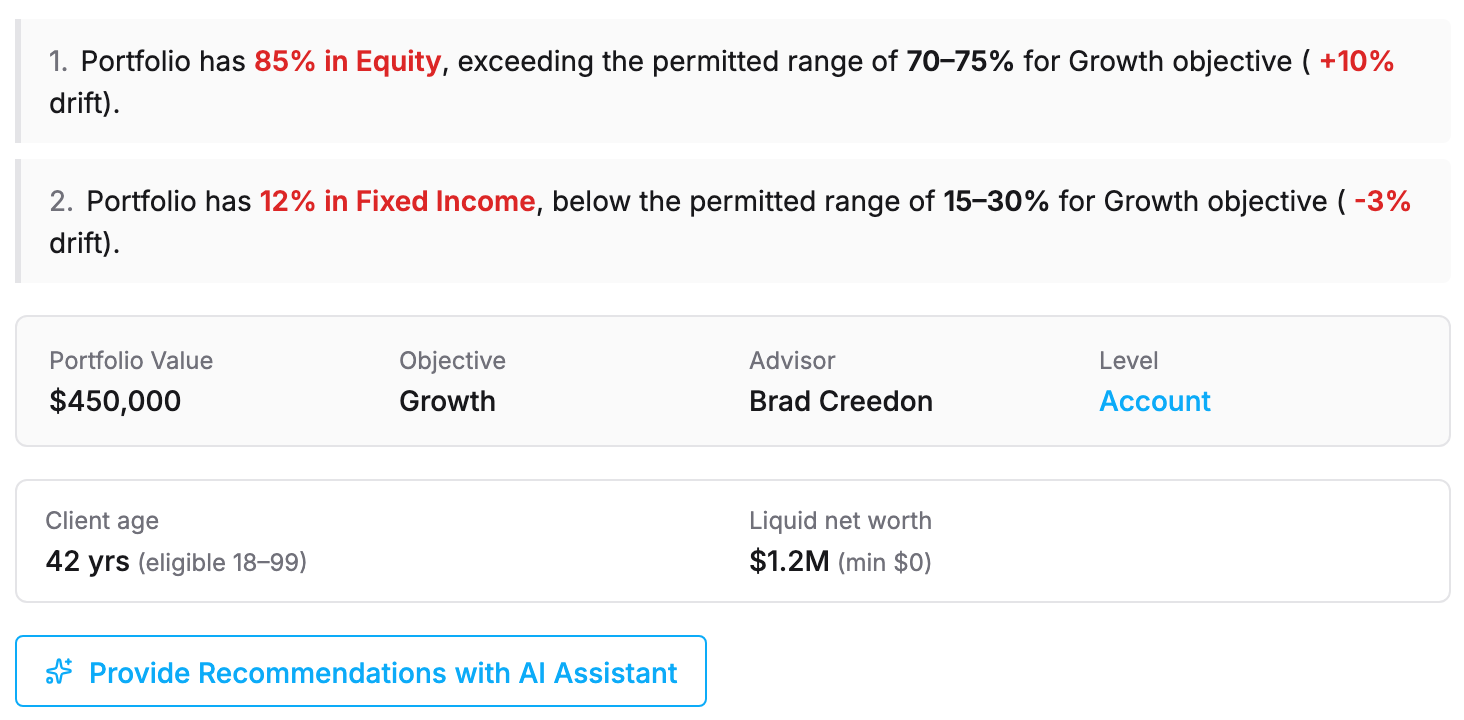
Every compliance team knows this rhythm. An alert fires. A principal opens it, reads the numbers, and then spends the next twenty minutes writing up what happened, why it matters, and what was done about it. Multiply that by every drift, trading activity, and concentration exception across the book, and documentation becomes the largest hidden line item in your supervision program.
Starting this month, those exceptions come with a written summary: what triggered the alert, the figures behind it, and jump links to the underlying detail. One click copies the summary into your review notes. The rationale goes in the file the moment you review, in the language you'd use with an examiner.
This is what continuous supervision looks like in practice. The system doesn't just flag the issue. It drafts the evidence.
The feature is rolling out to all firms over the coming days. If you want to see it live, we're demoing it in our August 20 webinar (details below).
Every position lands matched, no matter how it arrives
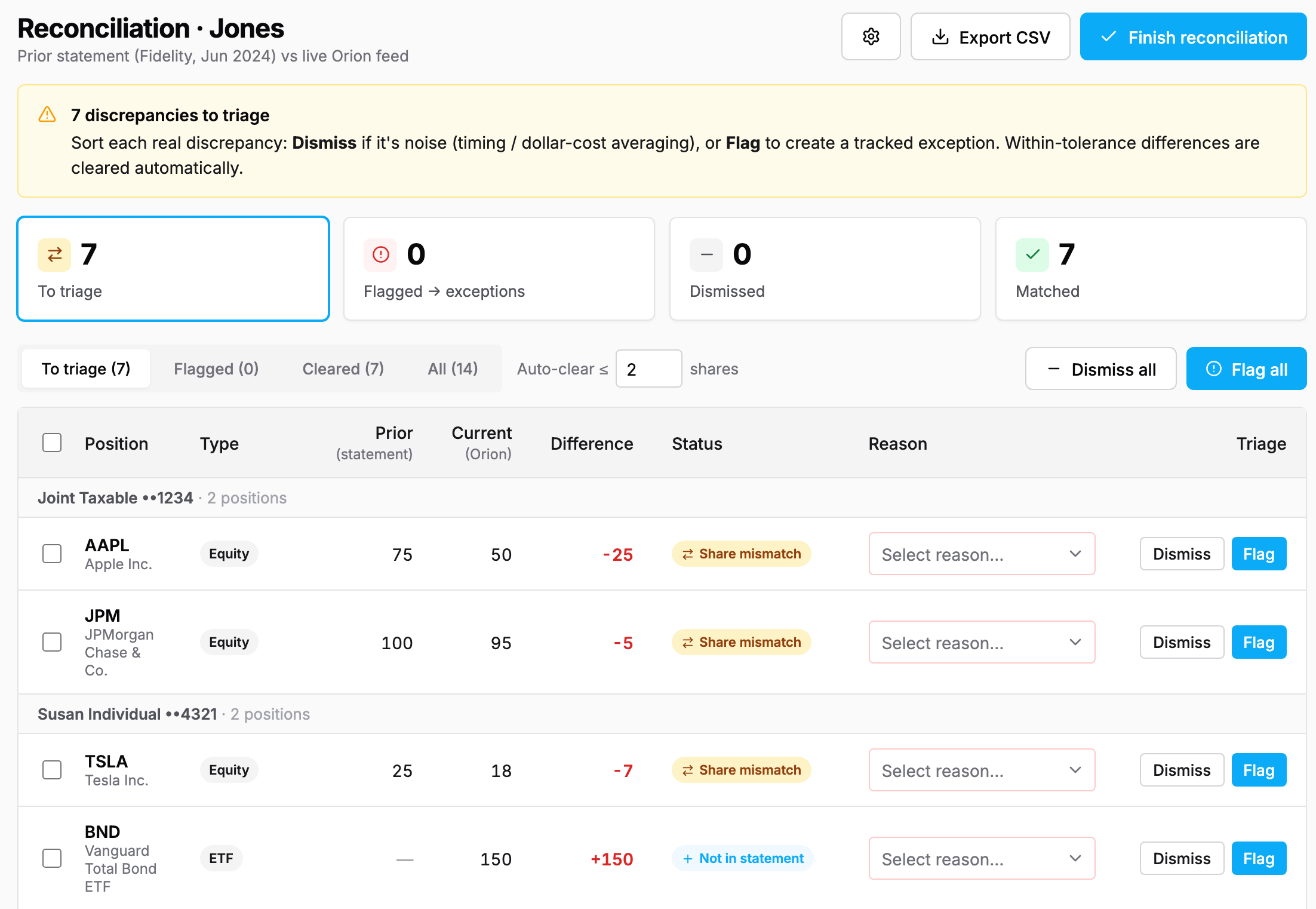
Risk analytics are only as defensible as the holdings underneath them. And holdings arrive messy: tickers get abbreviated, CUSIPs go missing, and the same fund shows up under ten different names depending on the custodian that printed the statement.
Every import path now runs through a three-layer matching engine. Exact identifiers first, then name matching, then an intelligent fallback for the securities that resist both. This covers CSV uploads, AdvisorIQ · Statement Scanning, and bulk model imports. The import review screen shows exactly how each row matched and flags anything worth a second look, so nothing enters your book unverified.
The result is a single, clean data lineage from the source document to the risk score. Clean holdings in, defensible numbers out.
Sharper classification, more trustworthy analytics
Structured products and derivatives are the instruments that trip up most classification engines, and misclassified securities quietly distort everything downstream: asset allocation, concentration monitoring, drift detection. Our upgraded classification engine now places these instruments correctly, which means the analytics your reviews depend on reflect what clients actually hold.
Statement extraction also got stronger. AdvisorIQ · Statement Scanning now reads uploaded statements with greater accuracy, capturing positions and account balances more reliably from the first pass.
Security and control, without new friction
Two upgrades for the teams who manage access:
Enterprise single sign-on. Advisors can now log in through SAML 2.0 SSO, with the same MFA, lockout, and network protections your firm already enforces on password login.
Orion via OAuth. The Orion integration can now connect through OAuth instead of stored credentials, using a guided flow that's fully compatible with existing connections.
Smaller updates that add up
Client Reviews dashboard stats. Overdue, due-soon, and changes-requested reviews at a glance, plus a weekly summary email so nothing slips past its date.
Custodian column in reports. The Share Class exceptions report and the Client Data Extract now show which custodian holds each position.
What's next
Three features are built and heading to production:
OperationsIQ joins the main platform. Document scanning and good-order review, native in your StratiFi login. One platform, one identity, one API.
Bulk Fact Sheet generation. Create fact sheets for all your custom securities in a single job.
Fact Forms Builder. Build and manage your own risk tolerance questionnaires, no ticket required.
See it live on August 20
Join Karan from our Customer Success team for Master the Exceptions Dashboard, a live walkthrough of the four alert types, how thresholds and cool-downs work, and how to document every exception in the platform. You'll see the new exception summaries in action, with live Q&A.
Thursday, August 20 · 12:00 PM ET · 11:00 AM CT · 9:00 AM PT
Not on StratiFi yet? Book a demo and see how firms run risk, compliance, and operations from a single system.